Kriti Templating in Hasura
Introduction
Kriti allows transformation of JSON via templating during the Hasura GraphQL Engine lifecycle.
Kriti has a JSON-like syntax that allows for the creation of JSON values via direct-construction, reference and branching structures.
There are two main ways that Kriti templates are used:
- String interpolation for fields
- Payload transformation
String interpolation can also be used inside Kriti payload transformations, so only payload examples will be used here. But note that when a field provides Kriti interpolation capabilities you can't use the full capabilities of Kriti templates, just the interpolation capabilities.
See Kriti's README.md on GitHub for additional details.
Usage in Hasura
At present, Kriti templating is available for:
Example
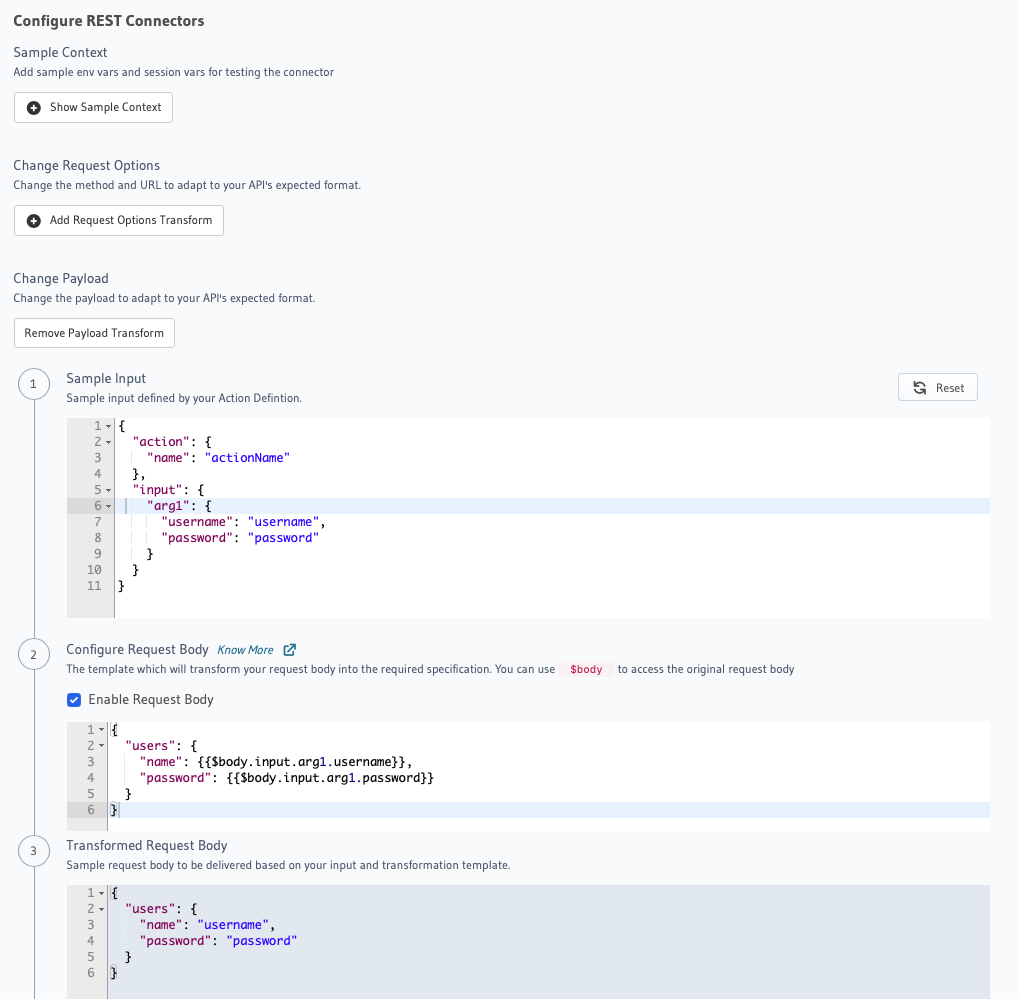
The following is an example of using Kriti templates for an Action REST Connector:
- Console
- API
Open the Hasura Console, head to the Actions tab, and click the Create button to open the page.
Add a REST connector payload and configure and test the associated template.
An API call to create an action can include an associated template to process the action handler's response:
POST /v1/metadata HTTP/1.1
Content-Type: application/json
X-Hasura-Role: admin

{
  "type": "create_action",
  "args": {
    "name": "actionName",
    "definition": {
      "arguments": [
        {
          "name": "arg1",
          "type": "SampleInput!"
        }
      ],
      "kind": "synchronous",
      "output_type": "SampleOutput",
      "handler": "http://httpbin.org",
      "type": "mutation",
      "headers": [],
      "timeout": null,
      "request_transform": {
        "version": 2,
        "template_engine": "Kriti",
        "method": null,
        "query_params": {},
        "body": {
          "action": "transform",
          "template": "{\n \"users\": {\n \"name\": {{$body.input.arg1.username}},\n \"password\": {{$body.input.arg1.password}}\n }\n}"
        },
        "content_type": "application/json"
      }
    }
  }
}
The template field is a string that represents a template in the language reflected in the template_engine field. In this case:
{
  "users": {
    "name": {{.input.arg1.username}},
    "password": {{.input.arg1.password}}
  }
}
Capabilities and behavior
The functionality of Kriti templates can be broken down into the following categories:
- JSON Value Construction
- Control Flow
- Value Interpolation
- String Interpolation
- Path Accessors
- Optional Chaining
- Functions
Most Kriti-specific functionality is introduced through the use of a {{ ... }} syntax.
JSON value construction
To construct JSON values in a Kriti template, you write JSON as usual.
For example, the following is a valid Kriti template and JSON document:
{
  "a": [1,2,3],
  "b": "hello world"
}
Value interpolation
Values can be interpolated in place of a normal JSON value. For example, the "b" field uses interpolation rather than a literal value here:
{
  "a": 1,
  "b": {{ 2 }}
}
String interpolation
Values can also be interpolated inside strings:
"Hello world {{ 1 }}"
Control flow
Conditional logic and loops are supported:
{
  "if" : {{ if something }} 1 {{ else }} 2 {{ end }},
  "loop": {{ range i, x := [1,2,3] }} ["item", {{ i }}, {{ x }}] {{ end }}
}
Path references
As part of interpolation and control-flow you may reference data via paths, of which a variable is a special case. The scope from which a path is looked up is either top-level, or expanded via control flow.
For example, if the variable foo contained the value 1, you could reference it like so:
{ "a": {{ foo }} }
If the variable bar contained the value {"x": 2}, you could reference it like so:
{ "a": {{ bar.x }} }
or:
{ "a": {{ bar['x'] }} }
Optional chaining
You may also use optional chaining to traverse into fields that may not be present. The value is Null if the field is not present:
{ "a": {{ bar?.x }} }
or:
{ "a": {{ bar?['x'] }} }
Null values can be defaulted via the ?? operator:
{ "a": {{ bar?.y ?? 3 }} }
Functions
Functions can be invoked from Kriti templates to interact with values.
These use the foo(...) syntax:
{
  "a": {{ concat([[1,2],[3,4]]) }}
}
The Function Reference section details the functions available by default. Note that there can be additional functions and values in the scope depending on the template context. These will be documented in the relevant documentation section.
Function reference
The following functions are available for use in all Kriti templates:
empty
Returns true if an object, array, or string is empty, if a number is 0, or if the object is null.
Raises an error for booleans.
Input:
{
  "object": {{ empty({"a": 1}) }},
  "string": {{ empty("") }},
  "array": {{ empty([1]) }}
}
Output:
{
  "array": false,
  "object": false,
  "string": true
}
size
Returns:
- the length of an array or string
- the number of keys of an object
- the value of a number
1fortrueand0forfalse0fornull
Input:
{
  "object": {{ size({"a": 1}) }},
  "string": {{ size("asdf") }},
  "array": {{ size([1]) }}
}
Output:
{
  "array": 1,
  "object": 1,
  "string": 4
}
inverse
- Reverses an array or string
- Leaves an object or
nullas-is - Takes the reciprocal of a number
- Negates a boolean
Input:
{
  "string": {{ inverse("asdf") }},
  "array": {{ inverse([1,2,3]) }},
  "number": {{ inverse(4) }}
}
Output:
{
  "array": [
    3,
    2,
    1
  ],
  "number": 0.25,
  "string": "fdsa"
}
head
Takes the first element or character of an array or string.
Throws an error if they are empty, and throws an error for all other types.
Input:
{
  "string": {{ head("asdf") }},
  "array": {{ head([1,2,3]) }}
}
Output:
{
  "array": 1,
  "string": "a"
}
tail
Drops the first element of an array or string.
Throws an error for all other types.
Input:
{
  "string": {{ tail("asdf") }},
  "array": {{ tail([1,2,3]) }}
}
Output:
{
  "array": [
    2,
    3
  ],
  "string": "sdf"
}
toCaseFold
Converts a string to a normalized casing (useful for case-insensitive string comparison).
Throws an error for non-strings.
Input:
{
  "string": {{toCaseFold("AbCd")}}
}
Output:
{
  "string": "abcd"
}
toLower
Converts a string to lower-case.
Throws an error for non-strings.
Input:
{
  "string": {{toLower("AbCd")}}
}
Output:
{
  "string": "abcd"
}
toUpper
Converts a string to upper-case.
Throws an error for non-strings.
Input:
{
  "string": {{toUpper("AbCd")}}
}
Output:
{
  "string": "ABCD"
}
toTitle
Converts a string to title-case.
Throws an error for non-strings.
Input:
{
  "string": {{toTitle("AbCd")}}
}
Output:
{
  "string": "Abcd"
}
fromPairs
Convert an array like [ [a,b], [c,d] ... ] to an object like { a:b, c:d ... }.
Input:
{
  "array": {{ fromPairs([["a",1],["b",2]]) }}
}
Output:
{
  "array": {
    "a": 1,
    "b": 2
  }
}
toPairs
Converts an object like { a:b, c:d ... } to an array like [ [a,b], [c,d] ... ].
Input:
{
  "object": {{ toPairs({"a": 1, "b": 2}) }}
}
Output:
{
  "object": [
    [
      "a",
      1
    ],
    [
      "b",
      2
    ]
  ]
}
removeNulls
Removes null items from an array.
Input:
{
  "array": {{ removeNulls([1,null,3,null,5]) }}
}
Output:
{
  "array": [
    1,
    3,
    5
  ]
}
concat
Concatenates a string, array, or object.
For object key collisions, values from right-most objects are used.
Input:
{
  "arrays": {{ concat([[1,2],[3,4]]) }},
  "strings": {{ concat(["abc", "def", "g"]) }},
  "objects": {{ concat([{"a":1, "b":2},{"b":3, "c":4} ] ) }}
}
Output:
{
  "arrays": [
    1,
    2,
    3,
    4
  ],
  "objects": {
    "a": 1,
    "b": 3,
    "c": 4
  },
  "strings": "abcdefg"
}
All of the above functions are also listed on the Kriti GitHub README.md.